CricBet99 Index — Read the Real Login Screen Titled Index Before Typing a Username
CricBet99 index is the sign-in screen that the CricBet99 mirror addresses serve under the page title Index, and knowing its layout lets you recognise the real form before you type a username. On 13 Oct 2026 it opened on .red, .win and .biz: a LOGIN heading, User Name, Password, Login, Login with Demo ID, then three short links.
This ticket is decoration: read-only inputs that keep nothing. Your real CricBet99 username goes into the portal form, and the desk on +91 81097 11726 issues one if you have none. Adults 18+.
Why the CricBet99 Index Title Belongs to the Real Login Shell
Open one of the CricBet99 mirror addresses that served the login shell on 13 Oct 2026 and the browser tab shows a single bare word: Index. Not CricBet99. Not Login. That word is not a menu, a game category or a list of anything, and the CricBet99 brand name never appears beside it.
When a visitor asks a web server for a folder without naming a file, the server hands back the file called index, which makes it the first page of that folder by default. The CricBet99 shell probably kept that default name in its title line. So the tab, the history list and any bookmark you save from it all read Index.
That is most of the mystery. Someone saves the CricBet99 shell, comes back weeks later to a bookmark that only says Index, cannot remember which address it was, and types cricbet99 index into a search box hoping to reach the same screen again (some type it back to front, index cricbet99, and are asking exactly the same thing). Six addresses carried that title on our test day: .red, .win, .biz, .blue, .club and .llc. Same shell, same word, same login. Reading the screen below as it stood on 13 Oct 2026 lets you recognise it on whichever CricBet99 mirror is working for you on the day you need it.
One wrong expectation is common. Because index sounds like a contents list, some readers expect a menu of games or a fixture list when they search for it. The CricBet99 Index screen has neither; eveything beyond the sign-in form waits behind Login. Think of the title as a file label rather than a description. It tells you which page of the shell you are on, the first one, and nothing about what the CricBet99 account opens once you are through.
Reading the CricBet99 Index Screen Element by Element, a Clear Ledger
The CricBet99 Index screen is short. There is no sport strip, no match board and nothing to scroll past, so a top-to-bottom reading is quick, and doing it once before the first real sign-in pays off because every later visit looks identical and anything out of place stands out straight away. Eight things, in the order your eye meets them:
Page title: Index
The word in the browser tab and in your history. No brand name sits there, which is the whole reason the cricbet99 index search exists. If the tab shows a long marketing title instead, you are on some other site, not the CricBet99 shell.
Wordmark and backdrop
The CricBet99 wordmark sits above the form. Behind it, a gradient fades from brown into green. Nothing else decorates the page.
LOGIN heading
One upper-case word over the form. It is the only heading on the screen.
User Name
The first input. The shell offers no mobile-number option, so the username from your CricBet99 ID details goes here, exactly as the desk sent it.
Password
The second input. On a fresh ID it is the temporary password from the WhatsApp chat; once you have changed it, the new one. What to do when it refuses is covered in the CricBet99 login field drill.
Login
The first action under the inputs. It sends the username and password for your real CricBet99 account and, if both match, swaps the shell for the lobby.
Login with Demo ID
One line lower than Login, and three words longer. Whatever sits in User Name and Password is ignored when you press this one; the session behind it runs on practice money.
reCAPTCHA line
The smallest text on the CricBet99 shell, naming Google's captcha service and pointing to Google's own privacy and terms documents. For you it means one thing: the real form has a bot check sitting behind it.
Below the form come three text links, each covered in its own section further down. That is the entire CricBet99 Index screen. Short, and deliberately so.
A worked example, phone in hand. You open cricbet99.red from a saved bookmark, and the tab reads Index; good, that is the shell. The CricBet99 wordmark sits at the top of the screen, the LOGIN heading under it. You tap User Name and enter the username exactly as it appeared in the desk chat, tap Password and enter the temporary password from the same chat (copying it from the message avoids mixing up similar characters), then press Login, not the demo route under it. The reCAPTCHA small print stays where it is, and if a captcha challenge appears you complete it before pressing again. When the lobby replaces the form, the read is done.
Had the tab shown a long title, or had the form asked for a mobile number with a +91 prefix, you would know you were somewhere other than the CricBet99 Index shell, and the right move is to stop typing and check the address.
CricBet99 Login or Login with Demo ID, Which Official Index Action to Press
Both actions sit together on the CricBet99 Index form, and the order matters a little: Login comes first, the demo route second. People with a fresh ID often press the wrong one. Easy mistake. The two labels share a word, the actions sit close together, and on a small phone screen a thumb aimed at Login lands on Login with Demo ID more often than you would expect, which then opens a lobby that looks right but shows a practice balance instead of yours.
Login, the Real CricBet99 Account Route
Fill in User Name and Password first. Login checks those two values against your CricBet99 account, and if they match, the shell gives way to the lobby with your own balance and your own history. If one value is wrong, nothing opens; the fix is to retype, then ask the desk for a reset if it still fails.
Login with Demo ID: Quick Practice on the CricBet99 Index Screen
No username needed. This route opens a practice balance: no deposit goes in, and nothing paid out is real. It suits a first look at how the CricBet99 lobby is laid out before you use the account the desk issued. Practice results stay in the practice session and never reach your real balance.
One habit helps. If you have just pressed Login with Demo ID and later want your real account, sign out of the practice session and return to the CricBet99 Index screen, then fill both inputs and press Login, rather than hunting for a switch inside the lobby that may not exist. The full meaning of the demo balance is set out on the CricBet99 home page.
Quick Links Below the CricBet99 Index Sign-In: App, WhatsApp, Share
Under the reCAPTCHA line the CricBet99 Index screen ends with three text links stacked one under another. They look like footnotes. They are not, because two of them are how most people actually get an account working in the first place, and the third is how a friend gets the same app. Read them as part of the CricBet99 Index screen, not as an afterthought tacked under it.
Download .apk matters only on the phone you plan to bet from. Found the Index bookmark on a laptop? Then open that same mirror on your Android handset and tap the link there, since a CricBet99 file saved to a laptop helps nobody; the install screens that follow are on the CricBet99 app download page.
Contact On Whatsapp is the route for anyone who reached the shell without credentials. The chat it starts is where a CricBet99 username and its temporary password get handed over, and it is also where a forgotten password is reset later; how to store the number and word that first message sits on the CricBet99 WhatsApp number page.
Share This Apk to Friend closes the list. During the 13 Oct check nobody on our side pressed it, so this page makes no claim about what it sends or to whom. Leave it alone unless a friend has actually asked you for the CricBet99 Android file.
A note on order. If you have no CricBet99 ID yet, the sensible sequence on this screen runs bottom-up: Contact On Whatsapp first to get the username and temporary password, Download .apk second if you prefer the app, and only then the form at the top. Typing guesses into User Name achieves nothing. On an iPhone the .apk link is no use at all, since that file is for Android; iPhone users stay in the browser and can pin the shell to the home screen from the Safari share menu.
None of the three needs a username. A visitor without a CricBet99 ID can still reach the desk or grab the app from the Index screen, which is handy when the bookmark is all you have left.
Which CricBet99 Addresses Showed the Live Index Screen on 13 Oct 2026
Each address in the CricBet99 family was opened on a phone on 13 Oct 2026 and the first screen noted down. Most of them came up as the Index shell. Five cells below keep only the results that matter to someone hunting for that title, because the remaining addresses forwarded elsewhere, showed a different site, or never answered:
.red and .winTested on 13 Oct 2026: the Index shell loaded.
.biz and .blueTested on 13 Oct 2026: identical LOGIN form under the Index tab name.
.club and .llcTested on 13 Oct 2026: the same Index shell again.
.goldTested on 13 Oct 2026: the full lobby, not the shell.
cricbet99.indexTested on 13 Oct 2026: no DNS record. Index is a search word, not an address.
That last cell catches people out. Typing cricbet99.index into the address bar goes nowhere, because no such domain exists; the word only lives in the page title. If you want the shell, open one of the mirrors above, or start from the CricBet99 red mirror, which loaded it on the test day. Statuses change, though. The dated list of every address we checked, including the ones that did not load, is kept on the CricBet99 link page.
Why does a working mirror matter more than a familiar one? Because the account does not care which door you use. A CricBet99 username created through the desk signs in on .red today and on .club tomorrow with the same balance, so when a saved address stops loading, the fix is to open the next mirror that still shows the Index title, not to ask for a new ID. Keeping two of them bookmarked is a small habit that saves a search later.
Index CricBet99 Shell vs the Full Lobby Sign-In: Best Use of Each
CricBet99 has two sign-in screens, and they they are easy to confuse. The Index shell is the bare form on the mirrors; the lobby login sits inside the full lobby site, with the sport strip and match board around it. Same account behind both. The layout differs enough, however, that someone who learned one of them can freeze for a second on the other, so the rows below line them up side by side:
Element
Index shell
Lobby login
Username input
User Name, no alternative
A choice between Mobile Number and User ID, then Enter User ID
Password input
Password
Enter Password, with an eye toggle to show it
Demo route
Login with Demo ID, placed after Login
Login with Demo, placed before Login
App download
Download .apk, a text link under the form
Download APK, alongside the sign-in actions
Getting an ID
Contact On Whatsapp link
A ready-made ID block that opens WhatsApp, plus a Register link
The demo row is the one that trips people up. On the Index shell the practice route comes after Login; on the lobby page it comes before. Same label, nearly, in the opposite place. Muscle memory from one screen therefore presses the wrong action on the other, and the result is a lobby with a practice balance where your real one should be, which looks like a missing deposit until you notice the session is a demo.
Which to use? In practice, whichever loads. The CricBet99 Index shell is lighter and turns up on more mirrors; the lobby login suits someone who wants to see the sports before signing in. Our CricBet99 login page walks through the lobby version field by field.
After the CricBet99 Index Login, Where the Secure Lobby Opens
Press Login with the right pair and the CricBet99 Index screen disappears. What relaces it is the lobby itself. Your CricBet99 session now runs on the mirror you started from. To get back to the shell later, sign out, or simply reopen that mirror address in a fresh tab and look for the Index title.
The lobby is where the account actually lives: the cricket exchange book, other sports, live casino tables, crash and instant games, all behind the one CricBet99 ID you just used. Your balance follows the username, not the address, so signing in through the Index shell on .win shows the same figure you saw yesterday on .club. On a first login with a temporary password, change that password before anything else.
Sometimes nothing happens. Hard to say why from the outside, but three causes cover most cases: a typo in User Name or Password, a captcha check that did not finish, or a mirror that stopped answering halfway through. Retype both values slowly, reload the page once, and if the CricBet99 Index screen itself will not load any more, switch to another mirror rather than retrying the dead one over and over.
Two smaller cases. If the lobby opens but the balance reads like a practice amount, you pressed Login with Demo ID; sign out and use Login. If the browser fills in an old password on its own from an earlier visit, clear the input and type the current one, since the CricBet99 shell will reject a stale value just as it rejects a typo.
Still stuck after a clean retype on a working mirror? That is a password matter, and the desk on +91 81097 11726 resets it in the chat. Not a mirror problem.
Index CricBet99 Searches Explained, the Trusted Login Screen Behind Both Phrases
Two search phrases, one screen. Pick a tab to see what each part of the query means on this page.
Where the cricbet99 index query lands, the real sign-in shell
Someone searching cricbet99 index wants the login shell whose browser title is the single word Index. On 13 Oct 2026 that shell answered on .red, .win, .biz, .blue, .club and .llc, and this page reads it from the wordmark down to the last link so you know it on sight.
Why index cricbet99 is typed the other way round, same quick answer
Index cricbet99 is the same search with the words swapped, usually typed straight from a bookmark that shows Index and nothing else. It points to the same CricBet99 shell, the same User Name and Password inputs, and the same ID.
The verified CricBet99 Index elements this page reads in order
Section two of this page holds the full ledger, so this tab only marks the borders. The CricBet99 Index screen starts at the tab title and the wordmark, its form stops at the captcha small print, and what follows belongs to the app, the desk and sharing.
Why cricbet99.index is not a working CricBet99 address
Index is a page title, not an extension. Tested on 13 Oct 2026, cricbet99.index had no DNS record, so typing it in the address bar fails; open a mirror that shows the Index shell instead.
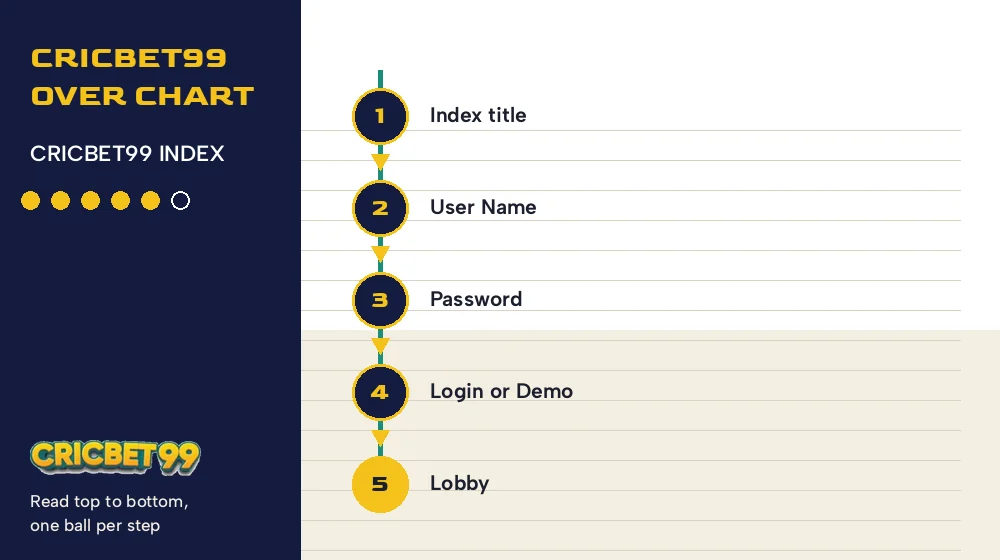
From the Index title to the lobby, in the order the shell asks for it.
CricBet99 Index FAQ: Fast Answers on the Real Login Screen
Third umpire review
What is CricBet99 Index?
CricBet99 Index is the login shell that the CricBet99 mirror addresses serve with the page title Index. On 13 Oct 2026 it loaded on .red, .win, .biz, .blue, .club and .llc. It holds a LOGIN form for your username and password, a demo route and three links for the app, WhatsApp and sharing.
Why is the CricBet99 login page called Index?
Index is most likely the default file name of the first page in the shell, and that name was left in the title line. A web server serves the index file when a folder is opened without a file name, so browser tabs and bookmarks show Index instead of CricBet99.
What is on the CricBet99 Index screen?
A sign-in form and very little else. The CricBet99 wordmark heads it, LOGIN titles it, and you fill User Name before Password. Login and Login with Demo ID follow, then the captcha small print, then links for the Android file, the WhatsApp desk and sharing the app, all over a brown-to-green gradient.
Is index cricbet99 the official CricBet99 login screen?
Yes, it is the real CricBet99 login shell that the brand's mirror addresses served when tested on 13 Oct 2026. The same ID and balance work on any mirror that loads it. Typing cricbet99.index as an address does not work, because that domain has no DNS record.
Should I press Login with Demo ID on the CricBet99 Index screen?
Press it only when you want a look around without your own account. Anything typed in the two inputs is ignored, the CricBet99 lobby opens on a practice balance that took no deposit, and results there pay nothing out. Your real ID needs the plain Login action above it.